















Tasaɛt
yessnen akkstsusmi.
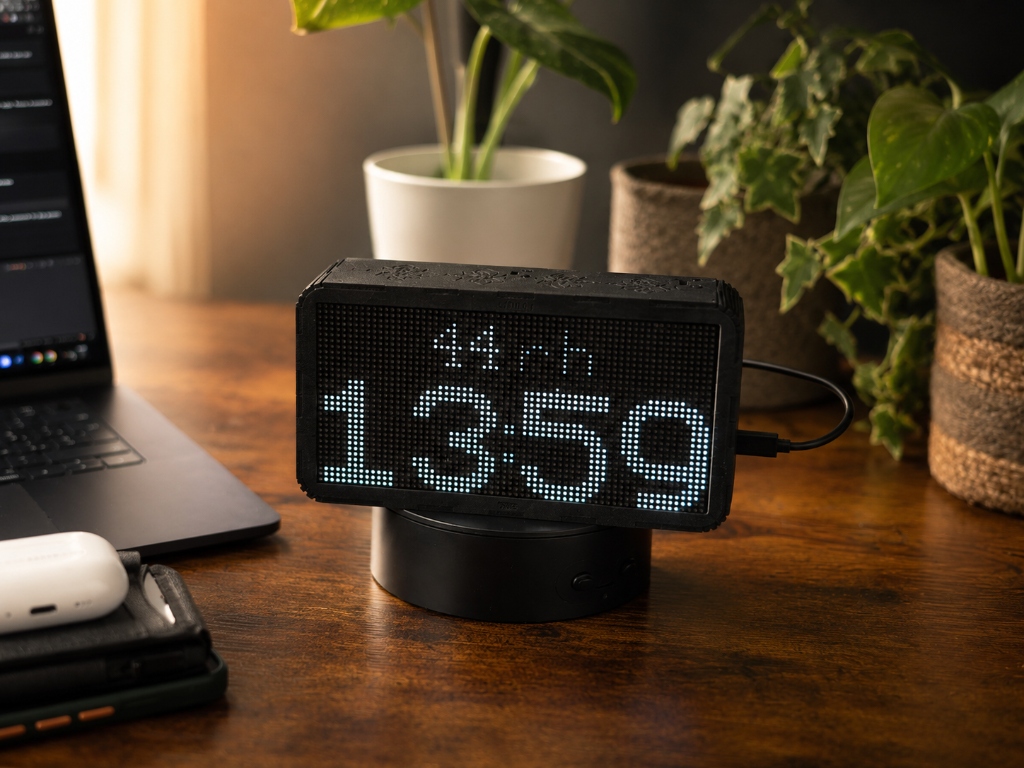
DotClock — handcrafted birchwood LED matrix desk clock showing time, weather, forecasts and news. DotClock d tasaɛt n tnarit s LED, tegga s ufus s wesɣar n derru. Yettban-d lweqt, anezwu, azallu, isalen d inebgiyen n zzelzla — seg wemkan-ik.
- 0Ur teḥwiǧed ara API
- 3 minAheyyi fessusen
- 9Isalen s waṭas
- 100%Asɣar n derru

Yennejmaɛ s ufus.
Yettwassen s 1,024 n yiṭij.
Yal DotClock tegga s wesɣar n derru.Ur yelli lplastik.
Yettwadeḥhen s zzit n ttejra.
- Akat
- Asɣar n derru
- Tadeḥnant
- Zzit n ttejra
- Aseddu
- Timuca n ufus
- Designed in Italy.
- Every curve, joint, and pixel layout is conceived and engineered in our Italian workshop — from the first sketch to the final firmware.
- Made in Italy.
- Each shell is cut, stained, oiled, assembled, and tested by hand in Italy. Not outsourced. Not scaled. One clock at a time.
No compromises.
Everything made in-house.
If the soul of this clock lives in the wood, its digital heart beats thanks to pure engineering. You won't find ready-made boards or off-the-shelf software inside.
I designed the entire hardware architecture from scratch, defining every single connection so the LED matrix and the control components talk to each other in the best way. In the same way, the software that brings the pixels to life was written line by line, optimised to deliver a fluid, responsive and intelligent experience.
From the first solder joint on the printed circuit board to the last firmware test, every step happens before my eyes and on my workbench. Creating technology means having total control over it: only this way can a digital object become a work of handcrafted art.
- Proprietary Hardware. Designed from Scratch.
- I designed and engineered the printed circuit board (PCB) from a blank sheet, to integrate perfectly into the wooden shell.
- Native Code.
- The internal software is written from scratch. Only pure optimisation to control every pixel.
- Electronic Craftsmanship.
- Timuca n ufus


Tafat deg wass.
Awraɣ deg yiḍ.
Yiwen n uḥessas n tafat yettẓar tafat n texxamt.
Ma yella yiṭij, LEDs ad nnernin.
Ma yella yiḍ, ad tuɣal d awraɣ ḥninen ur k-yessnekkar ara.
- Total Night Comfort (optional)
- At night, the clock automatically switches to a softer colour palette and dims the LEDs to the minimum level you set, so it won't disturb your sleep but stays readable.
- Automatic Shut-off in the Dark (optional)
- Want total darkness to sleep? When you turn off the room light, the clock detects it and switches the display off completely. It turns back on by itself as soon as a ray of sunlight comes in or you switch the light on.
- Customisable Daytime Window
- You decide the rules of time. Set the hours when the clock is free to express its full brightness, and when instead it should start being discreet.


Your words,
on the clock.
Add your own messages — a birthday, a reminder, an inside joke — and they scroll right alongside the weather. Pick a colour (or three) and an icon. Schedule them to a date window or leave them always on.
- Message & Colour
- Up to 32 colour slots, one per message
- Optional Icon
- Chosen from the clock's built-in icon library
- Start & End
- Pin a message to a birthday, event, or deadline
- 32-Colour Palette
- Defined once on Themes — reused everywhere
Awalen-ik,
iɣeżlan deg yiskay.
Err DotClock-ik d yiwen wayeḍ s tidet. Ma d aɣanib usligen i weɣmis-ik neɣ d tizregt ur tettuyed ara, ad nekker-d awalen-ik s tuzegt n laser deg yiskay, nessefru tikta-yas seg tazwara kan fell-ak. Yal taseftit tettiwsemsar s usuter — tettwakkes-d aẓar deg usmeny d wakud n usken — maca ad yili d amedya ur yettunefk ara.
- Deffir
- Tazmilt d thusit. Isem, azemz ur yettuned, neɣ tabrat tusligt. Inek kan.
- Afella
- Deffir uɣmis. Yiwen usrag n yinig usmad deg yiger n ufella, tameslayt n wass-wass.
- S usuter
- Yettiwsemsar s usuter s tuzegt n laser. Akud n usker iteddu. Mḍel-aɣ-id qbel ad tessemseṛeḍ ttalaba-ik akken ad nesnirmes asebter-ik usmad.
Your clock,
your palette.
Build as many themes as you like — the clock cycles through them automatically. Mark a set for night-time, reorder the rotation, and preview any colour live on the display before you save.
- Auto Rotation
- Enabled themes cycle through the display automatically
- Night Set
- Mark themes for night — swaps in when Adaptive Brightness is on
- Live Preview
- Tap any swatch to send the theme to the clock before saving
- Custom Order
- Use arrows to set exactly how themes appear in the rotation
Tazmert s tsusmi,
deg tenwaṭ n wesɣar.


-
Anezwu s timmad-is
Tazɣelt, aḍu, UV d ugeffur, s timmad-is seg wemkan-ik.
-
Tafat yettbeddilen
Aḥessas n tafat yettwali texxamt. Tafat deg wass, awraɣ deg yiḍ.
-
Isalen n tura
BBC, RaiNews, El País — fren isalen-ik.
-
Zzelzla d inebgiyen
Isalen n zzelzla d inebgiyen n lḥal n tmurt-ik.
-
Yettwahegga seg navigatour
Ldi dotclock.local deg yal aselkim. Ur teḥwiǧed aplikasyun.
-
4 isekkilen
Fren isekkilen i k-ihwan.
-
Aṭas n tutlayin
Tamazight, Taglizit, Tafransist, d tiyaḍ.
-
Yetcfu ɣef kullci
Isuyas akk ur ttruḥen ara ma yeɣli trisiti.
Ulac aplikasyun.
Ulac amiḍan.
S shala.

Qqen tasaɛt, ṭṭef QR code, fren Wi-Fi. D ayen fessusen.
- 01
Qqen-it
USB-C deffir. Askan ad d-yefk QR code.
- 02
Ṭṭef d qqen
Wali QR code s tilifun, fren Wi-Fi inek.
- 03
D ayen
Tasaɛt ad tawi lweqt, anezwu d yisalen.
Yettwaxdem i wakken
ad yidiri.
Yettwaxdem akken ilaq i wakken ur tettxemmimeḍ ara fell-as.
- Azuk
- 640 g
- Ileqqmen
- S wazwu
- Askan
- 64×32 pixel
- Aḍman
- 2 iseggasen
- Akat
- Asɣar n derru
- Iḥessasen
- Tafat · Tasaɛt
- Tazmert
- USB-C · 5 V · 1 A
- Tuqqna
- Wi-Fi 802.11 b/g/n
- Tisekkiwin
- 240 × 95 × 45 mm
- Aheyyi
- Navigatour, ulac aplikasyun
Loved by thousands
Loved by thousands
We're just getting started
Be the first to share your experience with the community and help others discover DotClock.
Ayen i d-steqsayen
medden.
Sraɣ amiḍan neɣ abonnement?
Uhu. DotClock ur yesɛi amiḍan. Yal aheyyi yettili-d seg navigatour.
Ansi d-tekkan isalen n lḥal?
Seg Google Weather API d USGS i zzelzla.
Yezmer ad yessen amkan-iw war GPS?
Ih, yesseqdac Wi-Fi i wakken ad yessen amkan-ik.
Ad iyi-yessenkar deg yiḍ?
Uhu, yett نقص tafat deg yiḍ.
Zemreɣ ad beddleɣ tutlayt?
Ih — yella Tamaziɣt, Taglizit, Tafransist...
Ma yella beddleɣ Wi-Fi?
Tasaɛt ad d-tefk Wi-Fi ines, tzemreḍ ad tt-tbeddleḍ.
Acḥal yezmer ad yidiri?
LED ad yidiri 50,000 n tsasɛatin, d asɣar ad yelhu s lweqt.
D acu yellan deg tenwaṭ?
Tasaɛt DotClock, amrar USB-C, d tqaɛet n tsirt.
Ur theggaḍ ara?
Awi-d aselɣu.
Yiwen n l'email m'ara d-nebdu. Ulac aserbeh.
— yemdanen llan yakan